Showing posts with label XML. Show all posts

Wednesday, September 30, 2015

BBEdit and "Text Factories"

I recently used a very powerful feature of BBEdit, the venerable text editor from Bare Bones Software for the very first time, and wanted to share this because it is so cool.

I had several hundred CSS files and I needed to do a series of 6 search and replaces on each file. I also had several hundred HTML files that needed a chunk of code inserted into the <head> element of each. After spending about an hour learning about BBEdit’s Text Factories feature, I was able to set it up and process all the files in a matter of minutes.

The Text Factories feature lets you create a list of text “transformations” such as changing case, adding prefixes or suffixes to lines, complex GREP find/change, sorting, fixing quotes, and more.
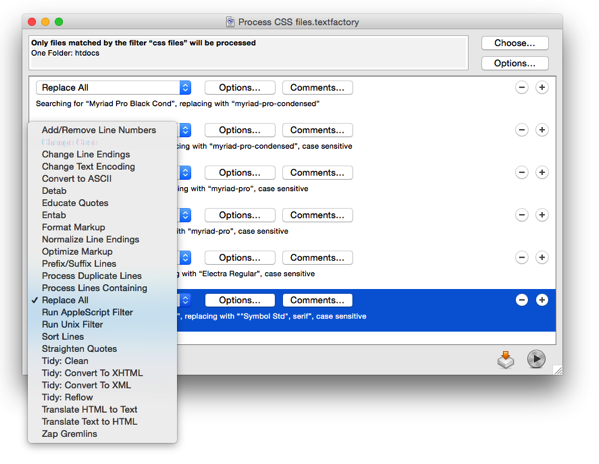
Screen Shot 2015 09 30 at 3 30 14 PM

Once you’ve created your list, you can apply it to the current document or selection, or to a specific list of files and folders.

Screen Shot 2015 09 30 at 3 37 30 PM

Subfolders within a folder can filtered, so you can specify certain top-level folders, but then restrict the text factory to only specific types of subfolders or files.

Screen Shot 2015 09 30 at 3 30 27 PM

As part of this project, I also used a little program called Hazel from Noodlesoft to solve another challenge. I was given a folder that contained thousands of files and subfolders. I needed to delete all the files of certain types within the folders, move certain files to new locations, and rename certain files. Hazel let me set up rules specifying what should be done to what type of file where, and then with a single command make it so. Very handy! 


Tuesday, February 15, 2011

Spring speaking engagements

Spring is just around the corner, and with it, an increasingly busy schedule. Here are three local events I'll be speaking at, as well as an event in Washington DC that you should consider joining me at.

March 24: AAF Central Minnesota Professional Development Luncheon in St. Cloud, MN: 5 Things Every Designer Must Know About the Adobe Creative Suite

April 28: MMPA 2011 Magazine Summit in Minneapolis, MN. I'll be presenting 2 sessions at the Summit: Repurposing Magazines for Tablet Devices and Adding Interactivity and Multimedia to Magazines with InDesign CS5

May 12: National Association of Government Communicators 2011 Communications School in St. Paul, MN. I'll be presenting one session: Designing for multiple outputs: iPads, Kindles, e-readers, tablets, Web sites, and smartphones

May 23-24: InDesignSecrets 2011 Print and ePublishing Conference in Washington DC. I'll be presenting two sessions: XML and InDesign Demystified, and Data Publishing with InDesign. I'll also be hanging out to answer questions throughout the conference. This conference is going to be great...don't miss it. Mention code DCKG523 to receive $25 off the conference registration.

Thursday, May 06, 2010

Preparing an InDesign file for an XML workflow

InDesign has great features for importing XML data from a database, or for exporting the contents of pages to XML format for re-use elsewhere. If you think that a project you're working on might someday become part of an automated XML workflow, here are some things to take into consideration as you set up your InDesign files.

General file setup

Your InDesign file should use master pages, margins and guides intelligently. Use margins and guides on your master pages to guide placement of text frames on your document pages.

Try to "flow" text in threaded text frames as much as possible, as opposed to individual text frames containing standalone bits of text. Your design and the type of data it contain will affect this, but it's a good rule in general.

All text must be fully styled with Paragraph and Character styles, and objects should be assigned Object styles where possible. No local formatting of text is allowed.

Rules for naming XML tags

XML data consists of text marked up with "tags" that look like this:

<head1>This is a headline</head1>

There are a few rules for how these tags can be named:

• Tag names cannot contain spaces
• Tag names are case-sensitive
• Tag names can’t start with “xml”, a number, or punctuation

Matching tag names to styles

A big part of any XML workflow, either into InDesign or out of InDesign, is to match up InDesign’s character and paragraph styles with XML tags. This can be done automatically if you’re lucky enough to have your XML tag names and your InDesign character and paragraph style names be exactly the same. So, when naming your InDesign styles, it's a good practice to follow the above rules for naming XML tags. If data with XML tag names already exist, consider naming your InDesign character and paragraph styles to match. If you’re in charge of creating XML tags, give them the exact same names as existing InDesign character and paragraph styles. This isn’t absolutely necessary, as there are other ways to map InDesign character and paragraph style names to XML tags, but it makes the process a whole lot easier.

Click here to read about four recent XML-InDesign automation projects I worked on, and the unique problems solved by each.

Wednesday, March 03, 2010

XML and InDesign case studies

I've been asked to work on some real interesting projects lately, all involving working bringing XML data into InDesign, or getting XML out of InDesign. Most of these projects involve automating the production of complex catalogs from product databases.

This sort of thing is kind of hard to get your head around, so I've put together a series of four "case studies" (1 page PDF each) that attempt to explain in a few paragraphs what each project involved, what challenges were faced, and how they were solved.

Case study 1: A company that sells molecules to research scientists asked me to develop a way for them to efficiently produce a massive 975 page catalog from their product database. Read the solution here.

Case study 2: An electronic components distributor asked me to automate production of complex "new product" brochures that are produced several times a year in eight languages each. Find the solution here.

Case study 3: A company that sells cake decorating supplies hired me to create an automated catalog production workflow that doesn't sacrifice designer's creative freedom. Discover the solution here.

Case study 4: A publisher of legal texts asked me to develop a way to extract product name, descripton and price information from hundreds of formatted InDesign files in XML format so they could import the information into their database. Read about it here.