Showing posts with label Scripting. Show all posts

Monday, August 28, 2017

Compatibility of InDesign scripts with future updates

One of the things that occupies a great deal of my time is writing custom scripts to automate Adobe InDesign. Most of these scripts are custom solutions to solve specific client workflows, but I have a handful of free public scripts available here.

The question I’m asked most frequently is this: “Will a script written for today’s version of InDesign continue to work in future versions of InDesign?" The short answer is “usually."

Scripts automate InDesign by accessing commands built into InDesign’s “document object model” or DOM. This DOM is an exhaustive, invisible-to-the-user list of commands available “under the hood” in InDesign that programmers can access to automate InDesign features and functions. 

There are no guarantees about what Adobe might do in the future—but this DOM has not undergone any type of wholesale change in many, many years. As Adobe adds and changes features in InDesign, typically only the commands in the DOM related to those features change.

So, for example, if you have a script that automates some sort of find/change function, you could reasonably expect this script to continue to function in future versions of InDesign until Adobe decides to change something with the way InDesign performs Edit > Find/Change. Many scripts originally written for InDesign CS3 10 years and 7 major versions ago still run perfectly today.

If Adobe does change something in the DOM that causes a script to cease working properly, typically the charge to update the script is a small fraction of the original development cost of the script.

Tuesday, April 05, 2016

A fix for ExtendScript Toolkit running slow

This post will only be of interest to people who create or edit scripts for Creative Cloud applications such as InDesign.

Since the end of 2014, the ExtendScript Toolkit, which is Adobe’s script editing tool, has had a problem with running very slowly on Macintosh computers running OS X 10.10 or later. See this forum thread for more details.

Scripter extraordinaire Chuck Weger discovered that disabling the “App Nap” feature of OS X restores the performance of the ExtendScript Toolkit.

1. Press Command-Shift-U to open the Utilities folder on your Mac

2. Double-click on the Terminal app

3. At the prompt, type:

defaults write NSGlobalDomain NSAppSleepDisabled -bool YES

For more information, see this article.

Want to learn more about scripting InDesign? See my InDesign Scripting Made Easy course on Lynda.com

Wednesday, December 16, 2015

I've been busy!

I spent many hours the last few months writing and recording 2 brand-new courses for Lynda.com, and completely updated and re-recorded an existing course. All 3 courses have now been released. Check them out!

Screen Shot 2015 12 16 at 8 30 45 AM

In InDesign Scripting Made Easy I’ve created a course for InDesign users to learn how to obtain, install, use, create, and modify scripts to help automate repetitive design and production tasks. Every InDesign user should watch this course!

Screen Shot 2015 12 16 at 8 31 10 AM

In InDesign: Fixed-Layout EPUB Interactive Techniques & Publish Online I show how to add a wide variety of interactive effects to InDesign documents that will be output as either fixed-layou EPUB or Publish Online projects. I show how to create slideshows, animation, quizzes, audio and video, buttons that trigger actions, and much more.

Screen Shot 2015 12 16 at 8 32 17 AM

My popular Up and Running with Dropbox course has been viewed by thousands since I released it in April of 2014. Since the initial recording, a lot has changed in Dropbox-land, so I updated and re-recorded the entire course. Think you know how to use Dropbox? Watch the course, and I can almost guarantee that you’ll learn something!

Wednesday, July 03, 2013

Digital Publishing Pack scripts updated

On my web site I sell a package of scripts that I call "Digital publishing pack 1: scripts for Adobe DPS". These scripts take much of the pain out of using the Object States panel, and automates the creation of button-driven "reveal and hide" multi-state objects.

I just added a new script to the pack: this script allows you to add the selected object(s) to a selected multi-state object as a new state, with a single click. Without the script, you must copy your objects to the clipboard, select the multi-state object, select one of the states, duplicate the state, paste the objects into the state, and then delete the original objects from the state. Painful…but the script makes this painless.

If you frequently create multi-state objects for Digital Publishing Suite projects, these scripts are a "must-have". The package of 7 scripts is a bargain at $19.95/workstation. No knowledge of scripts required…full installation and use instructions are included.

ScreenSnapz001

Tuesday, January 22, 2013

New Scripts to automate Adobe DPS

In my work with Adobe Digital Publishing Suite (DPS), I've found that there are certain tasks when creating interactive content that are either highly-repetitive, or difficult and tedious to do. I decided to try to do something about this.

The first outcome of this is a set of 6 scripts that I call "Digital publishing pack 1: scripts for Adobe DPS". In a nutshell, the scripts makes creating a button-driven "reveal and hide" object completely automatic. It also makes it possible to add objects to all states of a multi-state object in a single step, and provides an easy way to move from one state to another within a multi-state object.

My on-line store contains more specifics about the scripts, as well as a brief demonstration video. The package of 6 scripts costs $19.95/workstation.

I'd love to hear what you think of these scripts. If you have ideas for other DPS-related tasks that should be automated, I'd love to hear those ideas as well. Thanks!

Wednesday, November 07, 2012

Free InDesign scripts

On of the things that I spend my time on is custom Adobe InDesign script development. Over the years, customers have come to me with some very interesting workflow and automation challenges that I've been able to solve by writing a script.

But I've also written a few scripts that I give away free in the hope that someone will find them useful. These scripts are all listed and described here. These include scripts for checking documents for flipped images, automating the Package process, playing each page of your InDesign file as a slideshow, transposing characters, and more. Check them out!

Thursday, March 10, 2011

Incredible workflow enhancement tool

[The following is a "guest post" by my friend Ed Klemz from Central Coast Solutions.]

There is an incredible FREE web tool you need to know about – Wolfram|Alpha: Computational Knowledge Engine. Its a color selection and analysis tool, and so much more!

This web site brings together certified information from EVERYWHERE - all scientific, statistical, mathematical, political, medical, all of it. And this isn't "wiki" data that has no basis in fact, only certified and highly scrutinized data gets to be referenced. See About Wolfram|Alpha to learn more about this tool, and how it came to be.

You present equations or terms to Wolfram|Alpha, and it gives you the answers. The depth of information here is nothing short of ridiculous, and this should be the home page for any research person, marketing trend guru, or anyone who wants to know the most common baby names in the US...

What about color you ask?
Since the entire knowledge base of human experience has been made available us in this tool, what happens if you enter something like "html green"? Why it tells you everything you want to know about it, including complementary colors, values of RGB, HEX, HSB, nearest web and Pantone equivalents...very handy.

Now enter "RGB 249, 86, 2" and see the stats, and note that it is Pantone 1655 - my favorite orange. On the "Representations" block, click the "More" button and see its CMYK value as well. Now we are getting somewhere!

Wolfram|Alpha is a lot more than just information
Its computational, meaning it can do math with your inputs. So red + green = olive. You get the picture.

Its all about workflow
Many top designers, art directors and brand managers have a set of colors worked out for developing their client's branding guidelines that show the RGB, CMYK, HEX (web) and Pantone values of each, and restrict the color set to colors that have equivalents across all four color spaces. This one simple thing streamlines your workflow and makes color perform from print to web with no variations.

Now go and Explore! To say this is the tip of the iceberg is a gross understatement.

-Ed

Monday, September 13, 2010

Two essential books for advanced InDesign users

If you do any InDesign scripting (or want to learn), or create any InDesign GREP searches (or want to learn), you need these eBooks by Peter Kahrel. If it were possible for eBooks to become "dog-eared", mine would be. I refer to one or both of these books almost every week.

Scripting InDesign CS3/4 with JavaScript is an 80-page concise tutorial on how to automate InDesign with JavaScript. Through clear explanation and lots of examples, Peter explains how to write and edit JavaScript for use in InDesign, and provides a good overview of the InDesign Document Object Model.

GREP in InDesign CS3/CS4 is a 65-page tutorial and reference guide for how to do complex, powerful searches in InDesign using GREP.

Despite the titles of these guides, Peter has recently updated both of them to cover InDesign CS5, as well as earlier versions. These are the only two published guides that I know of that cover these two subjects...I'm glad that Peter has done such a great job.

Monday, January 25, 2010

Pimp my Image Processor

The Image Processor in Photoshop CS4 is a simple, fast way to quickly resize and convert a bunch of images to JPEG, PSD or TIFF format. One shortcoming of the Image Processor is that if you use it to export JPEG images, they're converted to RGB. Thankfully, this Photoshop feature is written in JavaScript, which means that anyone who knows a bit of JavaScript and Photoshop can modify it.

Well, Mike Hale has done just that. He's tweaked the Image Processor script to add support for exporting CMYK JPEGs as CMYK, as well as support for exporting PNG images. You can download his modified script here. To install the script:

1. Unzip the downloaded file. Rename the Image Processor CS4 PNG.jsx file to Image Processor.jsx

2. In your Adobe Photoshop CS4/Presets/Scripts/ folder, move the file Image Processor.jsx into another folder somewhere as a backup

3. Copy the Image Processor.jsx file from step 1 into the Adobe Photoshop CS4/Presets/Scripts folder.

You can access the Image Processor script from either File > Scripts > Image Processor in Photoshop, or, better yet, from Tools > Photoshop > Image Processor in Bridge.

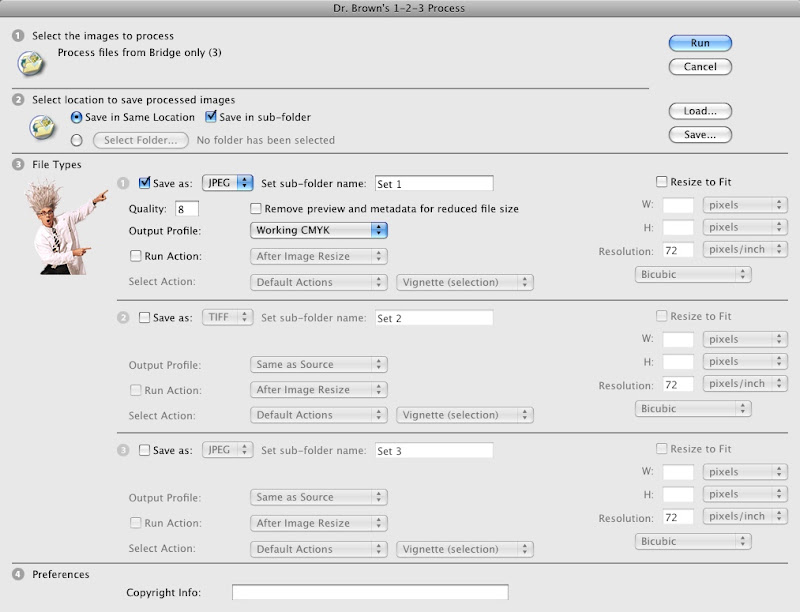
Another script for exporting CMYK JPEG images is the Dr. Brown's Services collection of scripts from Adobe's own Russell Brown. The Dr. Brown 1-2-3 Process script that's included with the collection allows you to not only export CMYK JPEGs as CMYK, but also to convert RGB to CYMK or vice versa while exporting.
Tuesday, January 19, 2010

Make the No Break attribute visible in InDesign

Selecting some text and then choosing No Break from the Control panel menu in InDesign is a good way to keep words together or to control line breaks. The problem with this command is that there is no quick way to tell later where in your text the command has been applied.

Ideally, there would be a way to use composition highlighting (Preferences > Composition) to display where No Break has been applied, but this isn't an option.

A neat technique in InDesign CS4 for highlighting text with the No Break attribute is to create a condition called "nobreak" that consists of a colored highlight.

Next, use Edit > Find/Change to search for the No Break attribute, and assign the "nobreak" condition to the found text. You'll need to repeat the Find/Change then the text is updated and you want to view the highlighted No Break text, but this is a slick technique.

There's no reason to go to all this work by hand. Peter Kahrel, an amazing British InDesign scripter, has created a free script called Highlight No Break which automates the steps above with a single click.

Tuesday, January 12, 2010

Tooltip script for InDesign

Back in 2007 I wrote an article for InDesign Magazine on how to add PDF tooltips to an InDesign CS3 file. (Examples of PDFs that incorporate PDF tooltips can be found here and here). In InDesign CS4, Adobe completely reworked the way that buttons are created and edited. The change was for the better, except that in the process, Adobe removed the dialog box that allowed you to enter and edit tooltips. The underlying code for handling tooltips is still in CS4, but the dialog box for viewing, editing and adding tooltips is gone.

I've written a script that adds the functionality for viewing, editing and adding tooltip text to buttons back to InDesign CS4. You can download the "Tooltip" script here.

Monday, December 07, 2009

InDesign script for Balance Ragged Lines

In a recent podcast, David Blatner and Anne Marie Concepcion, proprietors of the excellent InDesignSecrets blog, talked about how InDesign's "Balance Ragged Lines" feature works. They discussed how the feature tends to favor a longer first line and a shorter second line, but that "under the hood" InDesign has the code to balance the lines differently.

I've whipped up a script that "exposes" this functionality in InDesign CS3/CS4. With this script you can tell InDesign to favor a shorter first line and a longer second line, or to try to make all lines the same length. See the documentation and example files that are packaged with the script for more detailed information.

Thursday, June 04, 2009

Cool Illustrator Scripts

I've been messing around with this set of free Illustrator scripts by Hiroyuki Sato. The scripts work in Illustrator CS3 and CS4, Mac or Windows.

Thesen 23 scripts do some interesting things with Bezier curve math, help evenly space out dashed lines, round corners, create arrowheads, and draw these interesting random tree-like shapes.

If this sort of thing turns your crank, see Hiroyuki's blog Lines About to Be Generated.

Monday, March 02, 2009

Scripting resources for InDesign

Adobe InDesign is fully scriptable, which means that anyone with a knowledge of basic programming skills with a language such as JavaScript, AppleScript or Visual Basic can learn to customize InDesign to automate repetitive or complex tasks.

I do quite a bit of InDesign script development for clients. JavaScript is my tool of choice, since it is cross-platform, working well on both Macintosh or Windows versions of InDesign.

I'm often asked for resources on how to get started learning how to program with JavaScript in InDesign. I wish there was a really good book I could recommend. But instead, you'll have to dig through the resources below:

Start by downloading these four critically important PDF files, published by Adobe, about scripting InDesign CS4:
Adobe Introduction to Scripting (CS4)
Adobe InDesign CS4 Scripting Tutorial
Adobe InDesign CS4 Scripting Guide: JavaScript
JavaScript Tools Guide (CS4)
Sample scripts that accompany the tutorials and guides above can be downloaded here.

Here are the equivalent PDF files for InDesign CS3:
Adobe Introduction to Scripting (CS3)
Adobe InDesign CS3 Scripting Tutorial
Adobe InDesign CS3 Scripting Guide: JavaScript
JavaScript Tools Guide (CS3)
Sample scripts that accompany the tutorials and guides above can be downloaded here.

There's a little bit of information about scripting in Adobe's online Help for InDesign [CS4].

Next, bookmark the InDesign Scripting forum on Adobe's Web site. This is a great place to learn from others about perplexing scripting questions.

Scripting InDesign with JavaScript by Peter Kahrel is the only recent book I've found that covers the JavaScript DOM (Document Object Model) for InDesign specifically. I highly recommended this book, available only as a downloadable PDF. Written for CS2, but most of the information is still relevant to CS3/CS4.

JavaScript: The Definitive Guide is a good general reference guide to the JavaScript programming language.

Dave Saunders, a prolific and talented scripter, posts occasionally to his JavaScripting InDesign blog.

Steve Wareham runs a blog where offers tutorials on how his various scripting projects were created.

Peter Kahrel, another prolific and very talented scripter, has several free scripts on his Web site. A good way to learn scripting is to examine and modify scripts written by others.

More scripts, both free and otherwise, can be found on Adobe's InDesign Exchange.

Happy scripting!